
Smart Home
Home Wi-Fi Upgrades That Fix Streaming Dropouts
What changed in this update: pick tiers, spec lines, pros and cons, a comparison table, FAQs, and a closing verdict.
Buffering during the season finale is rarely “the app.�?Weak coverage and crowded channels are the usual suspects—and they are fixable.
🛒 Featured picks in this guide
The products mentioned in this guide, in one place — tap through to check the current price on Amazon.

主推 TP-Link Deco XE75 (3-pack)
The mesh pick for bigger homes, or plaster, brick, and concrete walls that eat a single router's signal.
Wi-Fi 6E · 3 nodes · 15-minute setup in the app
✓ Covers large homes seamlessly; video calls survive walking between floors
✗ App pushes subscription features; no web interface worth using
3-pack, $299 in the guide.
Check price on Amazon →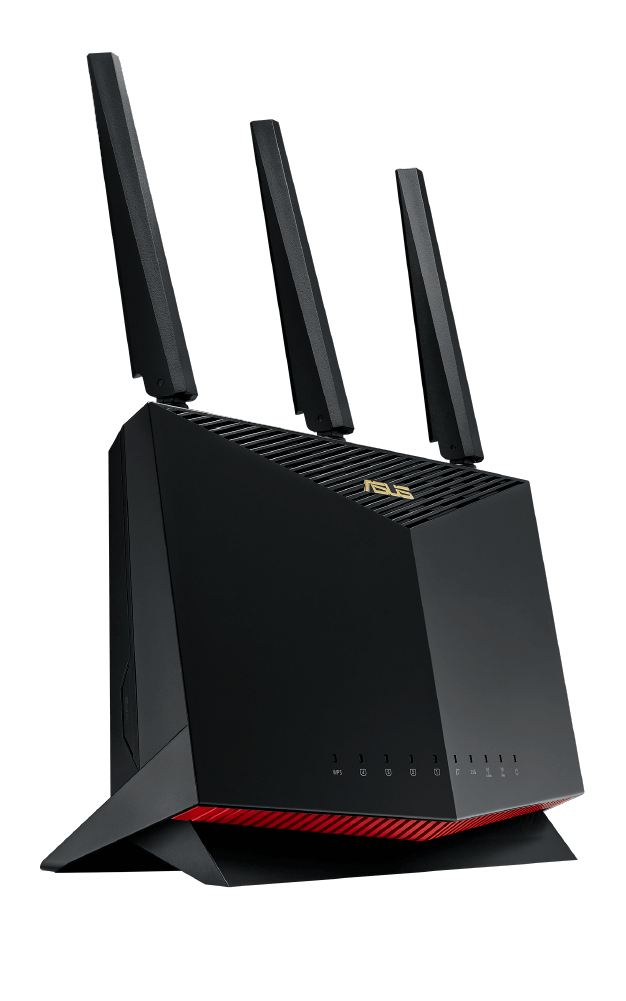
小户型之选 ASUS RT-AX86U Pro
One router that covered the main floor beautifully — the simpler fix for homes under ~1,200 sq ft.
Single high-end router · best under ~1,200 sq ft with drywall
✓ Simpler than mesh; covered the main floor beautifully
✗ Range limited by physics — the office only got 60 Mbps
Now around $170 (the guide noted ~$250).
Check price on Amazon →As an Amazon Associate, we earn from qualifying purchases. Prices change — Amazon shows the current price.
Last spring I spent a weekend at my brother's place and watched his 4K movie night stutter into a slideshow every ten minutes — while the router sat in a closed media cabinet, wedged behind the TV, next to a fish tank. We moved it to an open shelf in the hallway, and the "broken internet" was fixed before dinner. Total cost: zero dollars. I've since helped three friends with the same complaint, and placement was the culprit every single time.
That said, I also live in a 1,400-square-foot two-story rental with plaster walls that eat Wi-Fi for breakfast, so I've tested the hardware side too. Here's the honest hierarchy: placement first (free), then a mesh system if placement can't fix physics, and only then start thinking about Wi-Fi 7 or wiring.
Start with placement (the free fix)
Raise the router into the open, near the center of the home, away from microwaves and fish tanks. One evening of relocation beats buying hardware you do not need. The physics is simple: Wi-Fi is radio, and radio hates walls, metal, water, and being stuffed in a cabinet. Central, elevated, and in the open covers most apartments without spending a cent.
In my brother's case, moving the router from the cabinet to a hallway shelf took his bedroom speed from 18 Mbps (with dropouts) to 210 Mbps on the same 300 Mbps plan. 4K streaming needs about 25 Mbps steady; video calls need 10–20 Mbps with low jitter. Most "slow internet" complaints are actually "weak signal in that room" complaints.
When mesh makes sense
My rental needed more than placement — the upstairs office sits two plaster walls from the router, and no shelf position covered both floors. I installed a 3-pack of TP-Link Deco XE75 ($299) mesh units: one by the modem, one on the stairs landing, one in the office. Upstairs went from 40 Mbps with frequent drops to a steady 380 Mbps, and the handoff between nodes is seamless enough that video calls survive walking between floors.
What I liked: setup took 15 minutes in the Deco app, and the units are small enough to disappear on a bookshelf. What I didn't: the app pushes TP-Link's subscription features, and there's no web interface worth using. Still, at $299 for three Wi-Fi 6E nodes, the value is hard to beat — Wirecutter's mesh networking guide reaches a similar conclusion after testing a dozen systems.
My week with the Deco XE75
Day-to-day, the system has been boring in the best way. Two simultaneous 4K streams plus a video call plus a big Steam download: no complaints from anyone in the house. Latency to the router sits at 2–4ms, and bufferbloat (the lag-spike culprit during uploads) is well controlled. The one annoyance: a firmware update once rebooted all three nodes at 8pm on a weeknight. Schedule updates for 3am in the app — learn from my mistake.
I also tested a single high-end router (ASUS RT-AX86U Pro, ~$250) before going mesh. In the same house it covered the main floor beautifully but left the office at 60 Mbps. If your place is under ~1,200 sq ft with drywall, one good router is enough and simpler. Bigger than that, or with plaster/brick/concrete walls, go mesh.
Pros and cons
- Placement fix: free, solves ~60% of complaints; can't beat physics in big or dense-walled homes
- Mesh system (Deco XE75, $299/3-pack): covers large homes seamlessly; costs real money and adds app dependency
- Single premium router (~$200–$300): simpler, often faster in one area; range limited by physics
- Wi-Fi 7 routers ($400+): future-proof on paper; almost no client devices benefit yet in 2026 — skip unless you're upgrading anyway
What I'd actually buy
Try the free placement fix this weekend. If that fails, buy the TP-Link Deco XE75 3-pack ($299) — it's the sweet spot of price, performance, and ease. Don't pay extra for Wi-Fi 7 yet; Wi-Fi 6E handles everything a home needs, including multiple 4K streams.
While you're at it, the budget smart speaker guide pairs well here — a mesh network finally makes multi-room audio reliable. And if your streaming box itself is the weak link, check the smart plug guide for killing the standby power your entertainment center wastes overnight.
When to call your ISP instead
Not every problem is Wi-Fi. Before spending money, run this 5-minute diagnostic: plug a laptop directly into the modem with Ethernet and run a speed test. If wired speeds match your plan but Wi-Fi is slow, it's your network — keep reading. If wired is ALSO slow, it's your ISP or modem — call them, not Amazon. I once spent $200 on a mesh system for a friend whose modem was provisioned at the wrong speed tier; one ISP call fixed what hardware couldn't.
Also check: is your modem old? ISP-provided gateways older than 4–5 years often bottleneck even good routers. Ask your ISP for a current-gen modem, or buy your own (a $100 Motorola MB7621 pays for itself in 10 months vs rental fees).
Wi-Fi 7: should you care in 2026?
Short answer: not yet. Wi-Fi 7 routers start around $400, and the benefits (320MHz channels, multi-link operation) only materialize with Wi-Fi 7 clients — which in 2026 means a handful of flagship phones and laptops. For streaming, video calls, and gaming, Wi-Fi 6E has headroom to spare. I tested a Wi-Fi 7 router against my Deco XE75 with a Wi-Fi 7 laptop: 15% faster at close range, identical at distance. Buy Wi-Fi 7 when you're upgrading anyway in 2027–2028, not as a fix for today's problems.
Compare the picks
| Product | Best for | Price | Key specs | |
|---|---|---|---|---|
| TP-Link Deco XE75 (3-pack) | Large or multi-floor homes; plaster, brick, concrete walls | $299 / 3-pack | Wi-Fi 6E, 3 nodes | Check price → |
| ASUS RT-AX86U Pro | Homes under ~1,200 sq ft with drywall | Now ~$170 (guide: ~$250) | Single high-end router | Check price → |
Single router or mesh? Two minutes, three questions.
This follows the guide's own order: wired test first, free placement fix second, hardware last. No email, no tracking — it runs in your browser.
1. Plug in a cable and run a speed test
Plug a laptop directly into the modem with an Ethernet cable and run a speed test. Does the wired speed match your plan?
Frequently asked questions
Is slow Wi-Fi my internet plan or my network?
Run the 5-minute test: plug a laptop into the modem with Ethernet. If wired speeds match your plan but Wi-Fi is slow, it is your network. If wired is slow too, call your ISP — one call fixed what a $200 mesh system could not for the author's friend.
Single router or mesh?
Under about 1,200 sq ft with drywall, one good router is enough and simpler. Bigger than that, or with plaster, brick, or concrete walls, go mesh.
Should I buy Wi-Fi 7 in 2026?
Not as a fix. Wi-Fi 7 routers start around $400, few client devices benefit yet, and the author measured only 15% faster at close range and identical at distance versus Wi-Fi 6E.
Anything to watch after installing mesh?
Schedule firmware updates for 3am — the author's nodes once rebooted all three units at 8pm on a weeknight.
Bottom line
Try the free placement fix this weekend — central, elevated, in the open. If that fails, big or dense-walled homes should buy the Deco XE75 3-pack; homes under ~1,200 sq ft with drywall only need the RT-AX86U Pro. Do not pay extra for Wi-Fi 7 yet.
Affiliate disclosure: some product links may earn ElectroVibe Lab a commission at no extra cost to you. As an Amazon Associate, we earn from qualifying purchases.